
2 min drill

2 min drill
2 Min Drill Puts the Clock on the Call, Not on Your Hands
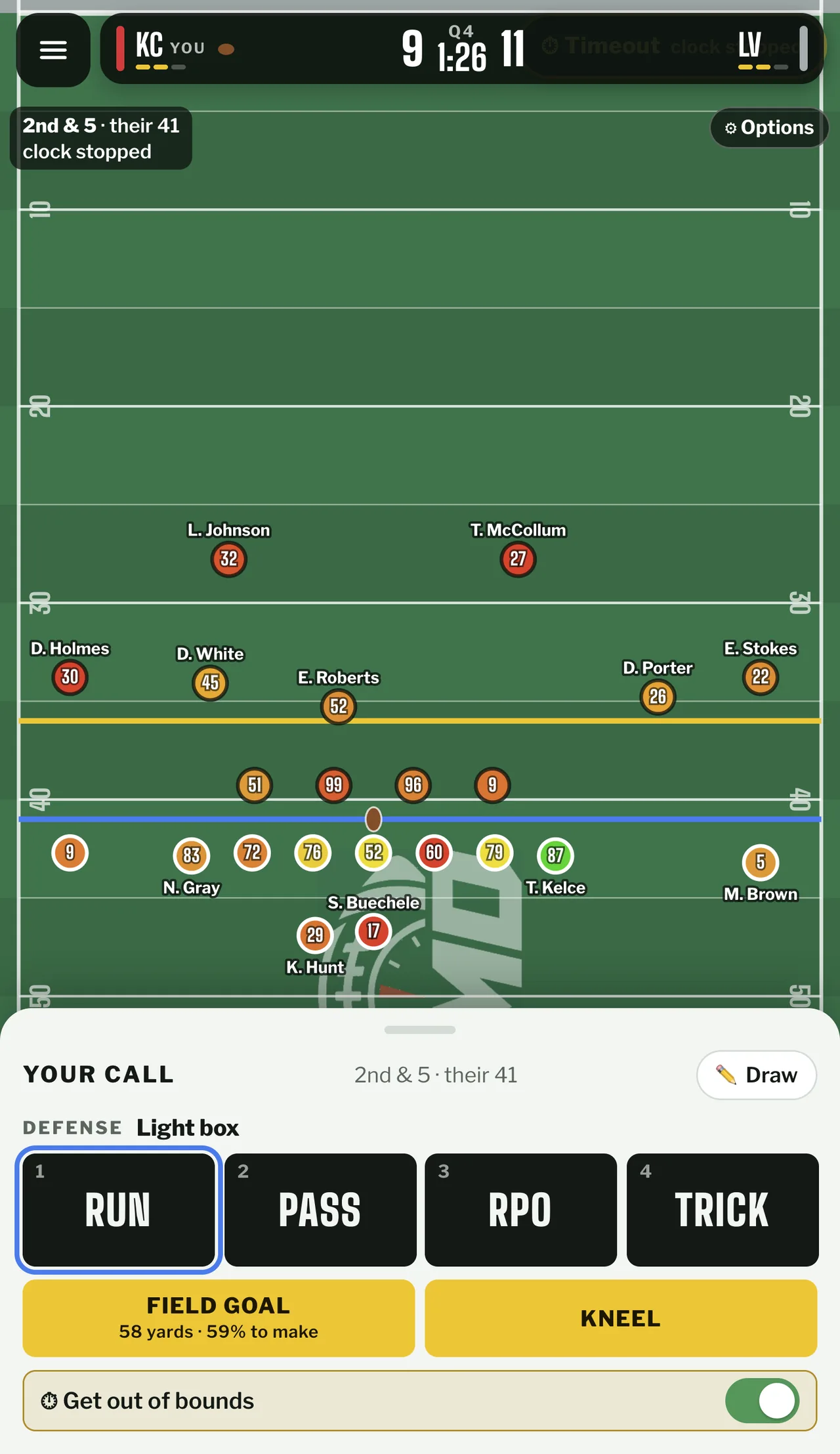
One call is the whole round in 2 Min Drill, and the round is the last two minutes of a real NFL game. You are given the score, the clock, the down and distance, the field position, the timeouts on both sides and the twenty-two players who were on the field. Nothing moves until you choose.
For a player who arrives from 2v2 io, the appeal is that the decision is the round. There is no aim to warm up and no movement to grind, so every snap is a read, a call and a grade, and a drive fits in the gap between two matches once you skip the animations.
The unusual part is what the grade ignores. A fourteen-yard completion that stops the clock can be marked a miss, and a dropped pass on the correct read can come back green. The game scores the decision separately from the result, which is the sort of feedback a ranked ladder claims to give and almost never does.
Play 2 Min Drill Free in a Browser Tab
No install and no account are needed for the daily drive. The game runs in a browser on desktop and phone, it can be added to a home screen and opened in its own window, and the log-in link in the header is for the leaderboard and for carrying progress between devices, not for playing.
The first load is the rough edge. The build ships several megabytes of play and situation data, including a playbook file of about 6.5 MB and an engine file near 5.4 MB, so a cold start on mobile data can sit on a loading screen far longer than the game deserves. Once cached, later drives open quickly.
Free covers the daily drive and Survivor, which is most of what the game is. Pro is a one-off payment of 4.99 dollars that unlocks historic drives such as the Helmet Catch and the 28-3 comeback, past dailies and a draw-your-own-route tool. It buys content, not a better grade, so the part that decides your score is already in the free build.
How a 2 Min Drill Snap Works, From Box Count to Grade
- 1
Read the spot
Score, clock, down and distance, timeouts and field position decide what is even available. The pre-snap read also names the defence as a light box, a loaded box or a blitz, and that line changes which calls are sensible. (No input)
- 2
Pick a family
Run, Pass, RPO or Trick. The family narrows the list without committing you, since RPO and Trick sit between running and throwing rather than replacing either. (1 to 4)
- 3
Choose the call
Twenty-seven calls sit under the four families: outside, off-tackle and inside runs, a sneak, a designed quarterback run, quick passes, screens, deep shots, play action, rollouts, a late Hail Mary and trick plays. (1 to 9)
- 4
Set the target
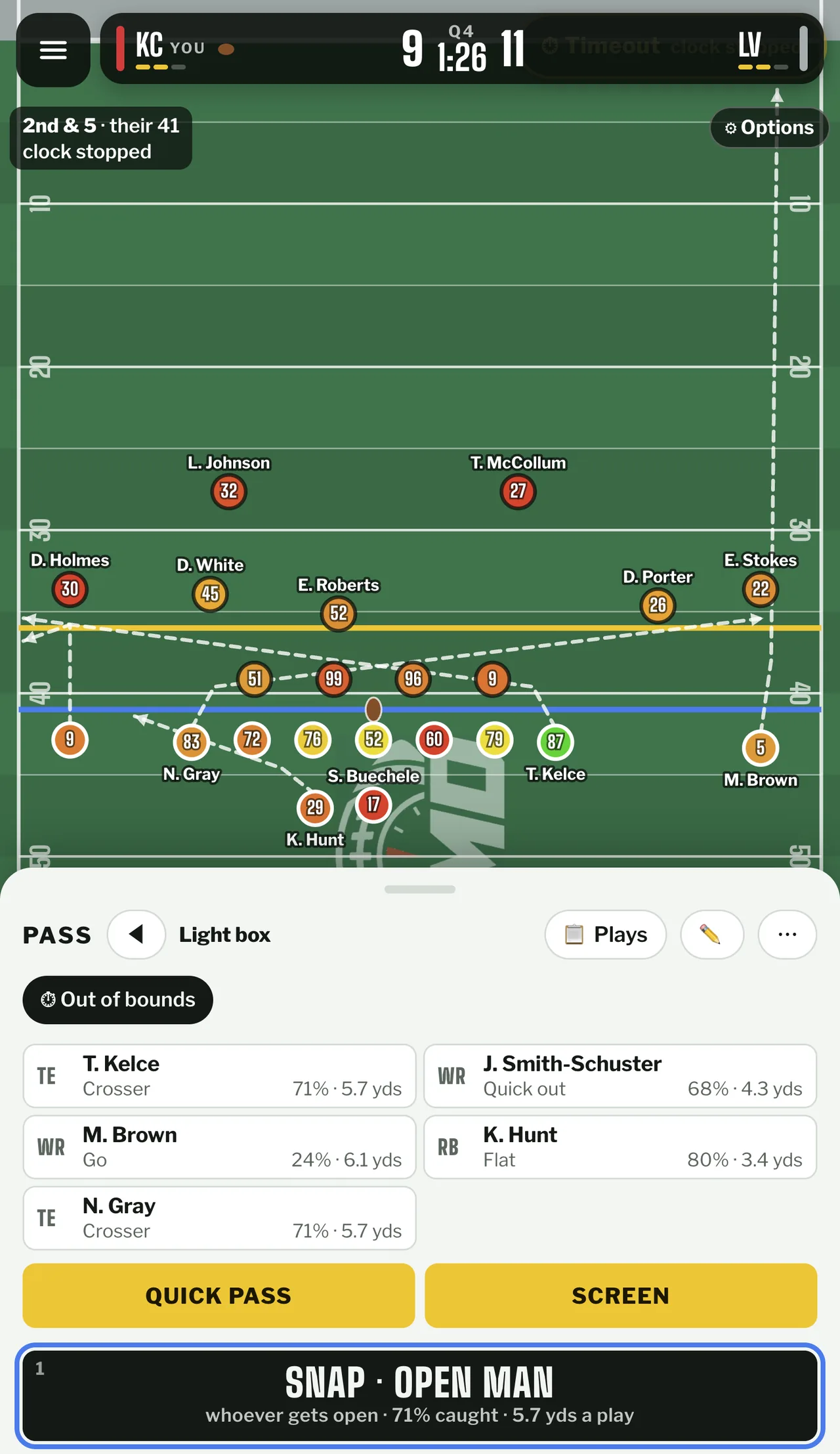
Each receiver shows a route, its catch rate and its yards per play before you commit. Tapping one changes the route, which is how the same call turns conservative or aggressive without changing its name. (Tap a receiver)
- 5
Manage the clock
Tempo is a real choice: no-huddle burns about 17 seconds, huddle about 34, and milk it about 38. Field goals show distance and make rate in the same panel, so a 58-yard attempt reads as a coin flip rather than a formality. (No-huddle / Huddle / Milk it)
- 6
Snap and read the grade
The play resolves into one real snap from the data set, the score and clock update, and the panel grades the call you made in a colour band with the win probability swing beside it. (Space to skip)
2 Min Drill Controls: Numbers, Space and No Stick
A mouse or a finger is the intended input: tap the family, tap the call, tap a receiver, tap Snap. The keyboard layer is deliberately shallow. The numbered buttons on the play panel answer to keys 1 to 9, Space skips the snap animation, and Tab and Enter move between buttons and confirm the highlighted one. Space is the key worth learning first. A snap animates in real time, and skipping it turns a play into a two-second confirmation, which is the difference between fitting three drives into a coffee break and one. There is nobody to steer, so there are no movement keys and no reason to reach for WASD.
The input method barely matters, which is the quiet achievement: the deciding act is a tap on a labelled button, and a tap behaves the same on a trackpad, a touchscreen and a number key.
The Grade Is Computed Before the Ball Moves
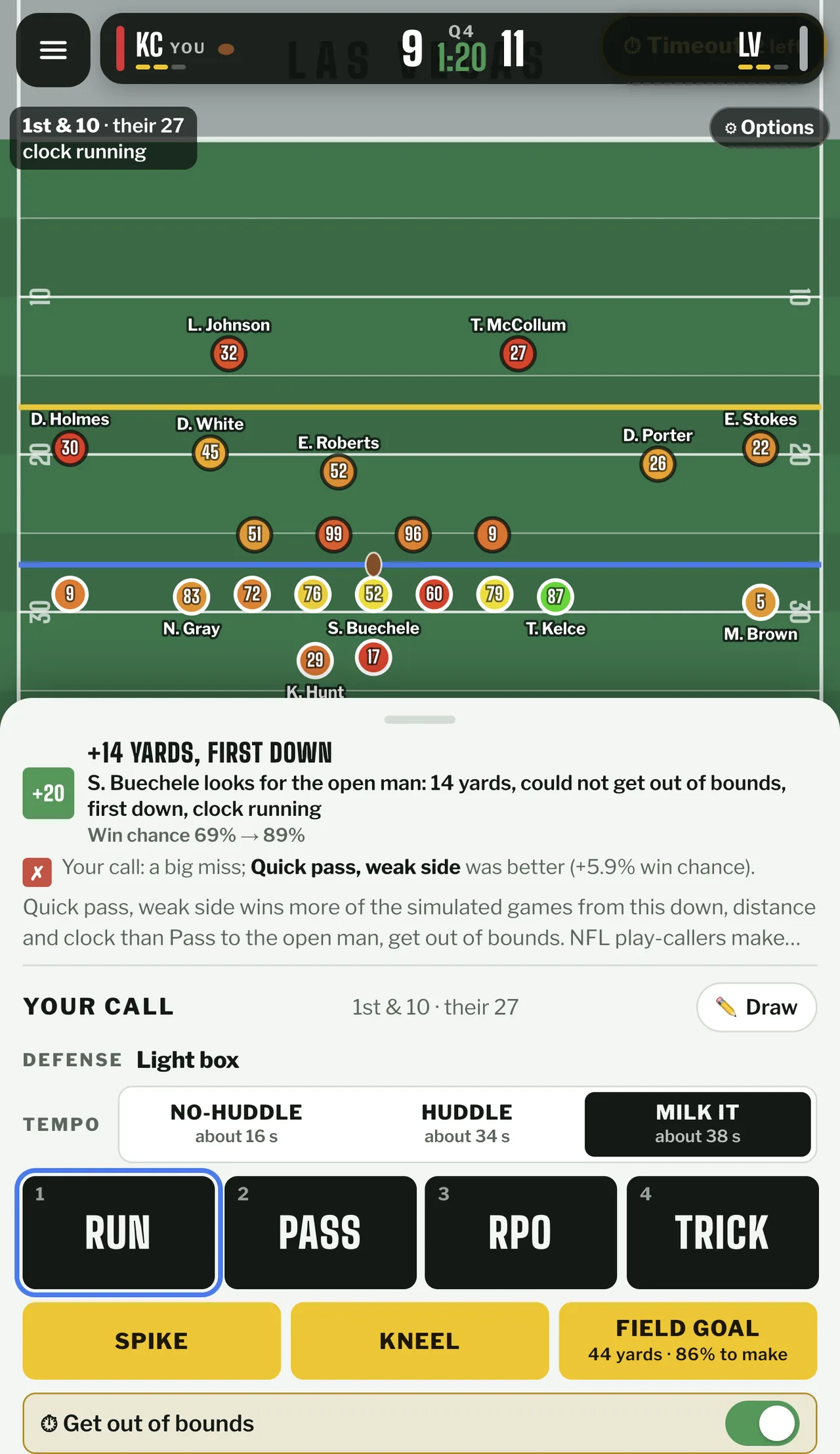
Before the result appears, the game simulates the rest of the game hundreds to thousands of times for every option that was on the table, then compares the win probability of your call with the best of them. Green means the best call or within half a point of it, yellow sits within two, orange within five, and red is worse than that.
The last screenshot below shows why the two numbers disagree so often. A fourteen-yard completion on second and five took the win chance from 69 percent to 89 percent, and the panel still marked the call a big miss, because a quick pass to the weak side would have been 5.9 points better. The result was good, the decision was not.
That is the reading habit to build: the big number is what happened, the colour band is what you chose. Players who chase the big number learn to repeat whatever worked once, which is exactly how a bad habit survives a whole season.
The percentile at the end comes from a different comparison. Six thousand simulated coaches play the same spot, their habits modelled on real play-callers, and your score measures how many of them did worse. A league-average set of calls lands near fifty.
2 Min Drill Screenshots: The Spot, the Targets and the Verdict
Survivor Is the Mode That Punishes a Throwaway Round
Survivor strings random real fourth quarters together. Win and you carry on into another one, lose once and the run is over, and a tie goes to overtime under normal rules. There is no reset button and no second attempt at the same spot.
That makes it the mode where the 2v2 io reflex has to be unlearned. Bailing out of a losing round costs nothing in a duel queue, but here the round is the whole run, so a speculative fourth-down conversion is not a gamble you can take back. My own leaning is to take the cheap points in Survivor and save the aggression for the Daily, where a bad call is graded and forgotten.
The Daily is the opposite arrangement: one spot a day, identical for everyone, ending in a percentile, a rank for that day and a shareable grid of your snaps. Pro adds the archive of past dailies and historic drives, which is the only way to practise a spot you already burned.
The official rules also describe a Versus mode under college overtime rules, with thirty seconds per call. It is listed alongside the other modes, but the official material does not show a live head-to-head screen, so treat it as a documented claim rather than a mode this page can vouch for.
What Is Actually Real in 2 Min Drill
The situations are real games, not generated ones: the rules page puts the library at around 740 spots split into three families, trailing teams needing a score, leading teams protecting the ball, and ties or end-of-half situations needing to reach field goal range. The data file that ships with the build holds 744 records, four more than the page claims.
Every snap resolves to one of 160,141 real plays from the 2022 through 2026 seasons, matched by call, down and distance and defensive look. The twenty-two players carry ratings between 40 and 99, positional percentiles for that week rather than invented attributes.
Two builds of this game exist, and the numbers get confused because of it. The version embedded here has 27 calls and the 740-spot library and dates its first daily to 12 October 2026. A second public build advertises 1,875 spots and 19 calls, labels itself a preview and cannot be embedded at all, since it refuses to load inside another page. Search results quoting 1,875 spots are describing that one.
The data comes from nflverse with FTN charting under a CC BY-SA 4.0 licence, and the footer states the project is independent and unaffiliated with the NFL, its teams, its players and the players' association. Naming the inputs is why a bad grade here is easier to argue with than in most browser sports games: the disagreement can be about the model, not the game.
Games Like 2 Min Drill for Players Who Read Before They Move
The other games on this site are built on the same short-round arithmetic: read the situation, commit, live with the result. The closest fits are below.


2 Min Drill FAQ: Grades, Modes and the First Load
Is 2 Min Drill free?
The daily drive and Survivor cost nothing and need no account. Pro is a one-time 4.99 dollar pack that adds historic drives, past dailies and the route-drawing tool, and does not change how calls are graded.
Do I need an account to play 2 Min Drill?
No. The game opens straight into a drive. Logging in is for the leaderboard and for keeping progress across devices.
What are the controls in 2 Min Drill?
Mouse or touch is the main input. Keys 1 to 9 trigger the numbered call buttons, Space skips the snap animation, and Tab and Enter move between buttons and confirm. There are no movement keys because there are no players to steer.
How does 2 Min Drill grade a call?
It simulates the rest of the game many times for every option available, then compares your win probability with the best one. Green is the best call or within half a point, yellow within two, orange within five, and red is worse. The result of the play does not change the grade.
Can I play 2 Min Drill on a phone?
Yes. The page detects a touchscreen and switches layout, and the build can be installed to a home screen. The weak point is the first load of several megabytes on mobile data.
Are the games in 2 Min Drill real NFL games?
The situations, the players and the play results are real, drawn from public play-by-play, participation and charting data. The grades are model estimates, not analysis from a coaching staff.
Is 2 Min Drill connected to the NFL?
No. It is an independent fan project, and the site states it is not affiliated with, endorsed by or sponsored by the NFL, its teams, its players or the players' association. Team and player names identify the real games.